01 Access
The door opens by invitation.
Aegis isn't open to the whole internet. Every account starts with someone trusted opening the door — no public sign-ups, no strangers wandering in.
Invitation-only · Always free
Aegis is a private, invitation-only space for the conversation you actually want to have. Your first chat asks who you want to talk to — share a name or username, and we'll add them to your profile. Always free. Just the two of you.


The Aegis way
A smaller, quieter way to meet someone. You arrive by invitation, say who you want to talk to, and keep the rest between the two of you.
01 Access
Aegis isn't open to the whole internet. Every account starts with someone trusted opening the door — no public sign-ups, no strangers wandering in.
02 Price
No subscriptions. No credits. No boosts. No surprise charges. Every feature, every conversation, every time.
03 Privacy
Aegis is built around the conversation between two people. Messages and calls are end-to-end encrypted. No audience, no noise.
04 The first hello
The first chat you see is Aegis support. It asks who you want to talk to — share a name or username, and we'll add them to your profile.
How it works
No endless sign-up, no discovery feed to figure out. Aegis keeps the beginning simple and the rest private.
Aegis is invitation-only. Use your private invite to join — there's no open sign-up and no crowd to wait behind.
Invitation requiredThe first chat you see is with Aegis support. It asks one simple question: who do you want to talk to?
Share a name or usernameTheir profile is added to yours. From that moment, the conversation is private and completely yours.
Always freeEvery step is free — and always will be.
Inside the app
Real screens from Aegis. Messages and calls are protected with end-to-end encryption, and you decide who gets close.
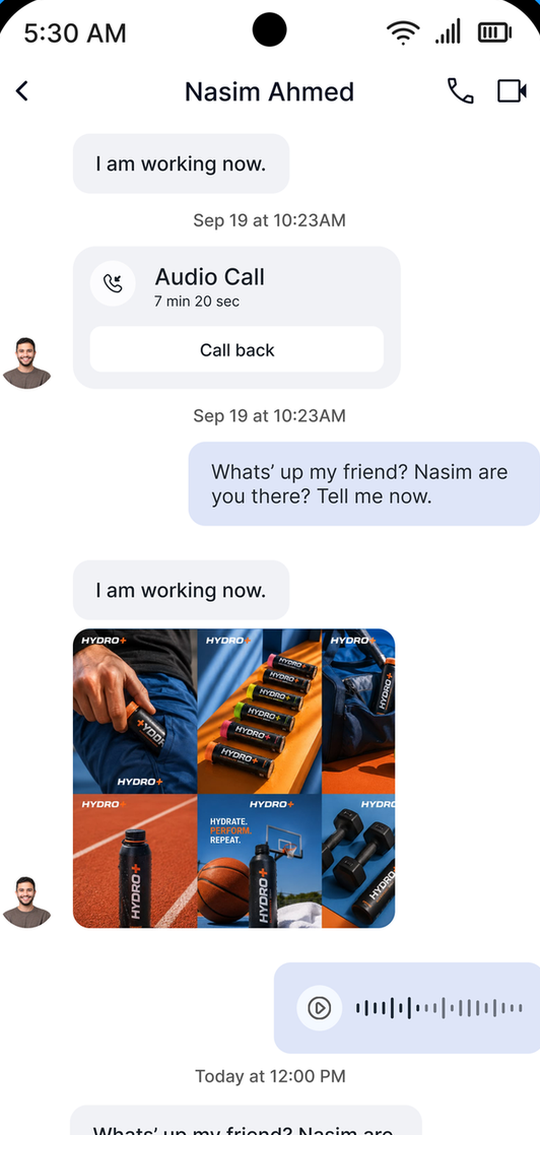
End-to-end encrypted chats, calls, and shared media.
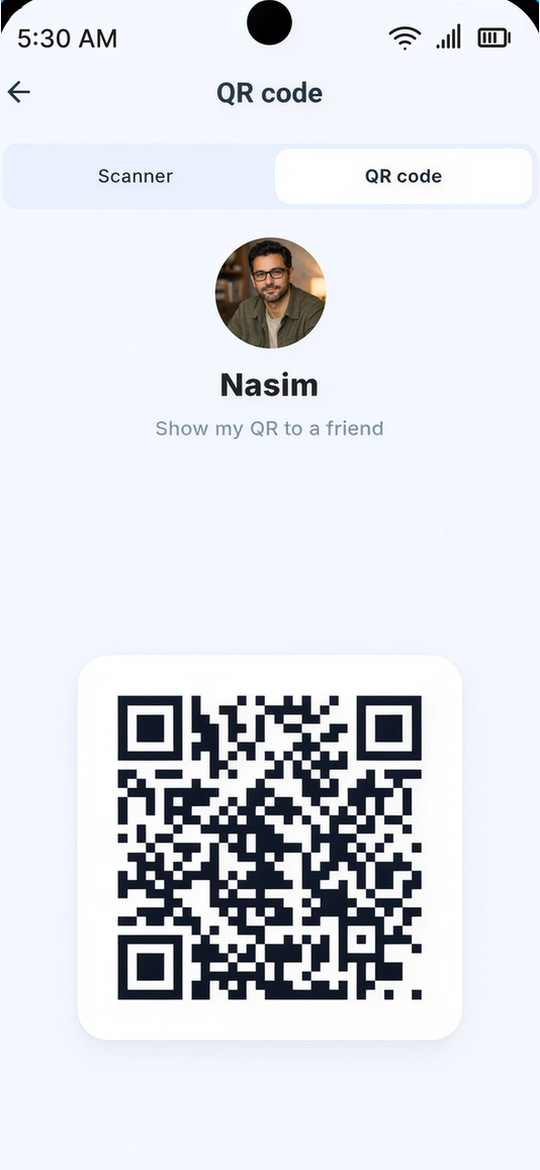
Share your QR code or username when you want to connect.
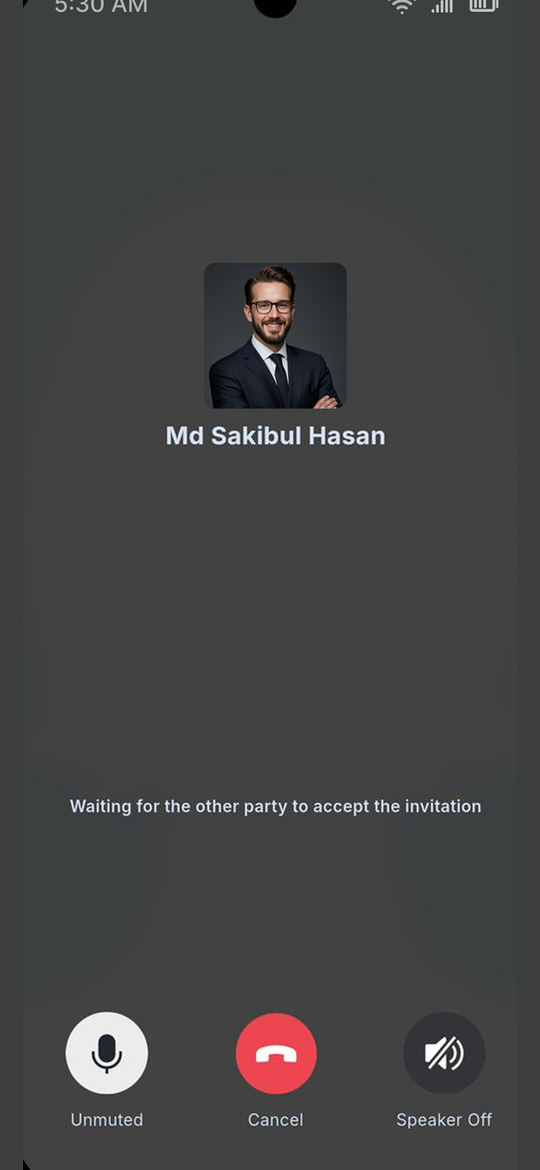
End-to-end encrypted audio calls, whenever you're both ready.
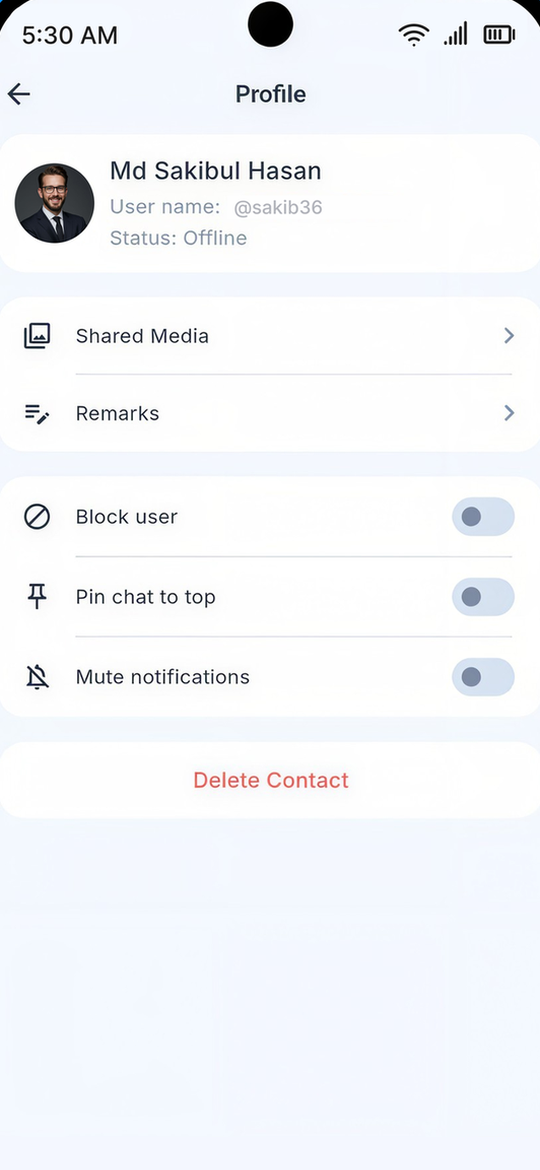
Privacy & security, by design
Aegis is built for private, secure, one-to-one conversation. Messages and calls are end-to-end encrypted — not a public feed, not an audience, not a performance.
The quiet part
Just a private conversation with the person you actually want to talk to. That's the whole idea.
How to get invitedThe price of Aegis
Aegis is fully free. No subscription, no credits, no paid boosts, no hidden charges. Every feature is available to every member.
If anyone asks you to pay for Aegis, it isn't us.
AEGIS
Access receipt
FAQ
Still curious? Write to us. We're happy to answer.
hello@aegisim.comAegis is invitation-only. A friend or an existing member must invite you. Use the private invitation they send you to join. Aegis itself never sends invitation codes.
Yes — completely. There are no subscriptions, credits, boosts, or hidden charges. Every feature is available to every member. Aegis will never ask you to pay to join or to keep talking to someone.
A chat with Aegis support is already waiting for you. It asks one simple question: who do you want to talk to? You can share a name or a username.
Once you tell Aegis support who you want to talk to, their profile is added to yours. From there, you can start your private conversation. No searching, no swiping, no noise.
Your conversation is private between you and the person you're talking to. Messages and calls are end-to-end encrypted. Aegis is built for one-to-one conversation — not a public feed, not an audience, and not a performance.
No. Every Aegis account starts with an invitation from a friend or existing member. There is no public sign-up and no way to request a code directly from Aegis.
No. Aegis never sends invitation codes, and the company cannot invite you directly. Invitations only come from people already inside Aegis. If someone claims to be Aegis and offers you an invitation code, treat it as suspicious.
Use the private download link in the download section. On Android, install the downloaded APK. On iPhone, install the Aegis configuration profile first, then install the app. Aegis never appears on the public App Store or Google Play.
Each permission has one job: SMS powers encrypted SMS chat, photos and videos let you share privately with your partner, and contacts let you find people already using Aegis. They are optional and can be changed anytime in your phone settings. Aegis uses them only for these features.
Don't pay. Aegis is fully free, and anyone asking for payment is not affiliated with us. Report it to hello@aegisim.com.
The door
Aegis never sends invitation codes. Every invitation is personal and comes from a friend or an existing member. If someone you trust has invited you, use their private invitation to join. If not, ask someone already inside.
Aegis will never send you an invitation code. They only come from members.
AEGISUse the private invitation a member sent you to open your account. There is no public sign-up.
A member invites you. A friend or someone already on Aegis sends you their private invitation.
You use their invitation. Follow the private link they shared to create your account.
Your first hello. Aegis Support asks who you want to talk to, and their profile is added to yours.
Aegis never sends invitation codes. Only members do.
Private download
Aegis is a private app, so you won't find it on the App Store or Google Play. Use the private link below — the same link works on iPhone and Android.
Open this page on the phone you want to install Aegis on.
Download Aegis
An invitation from a member is required to create an account.
Open this page on your Android phone.
Tap Download Aegis to download the APK.
If your browser asks, allow installs from this source, then open the file and install Aegis.
Use only the private link above. Need help? Contact us.
Open this page in Safari on your iPhone.
Tap Download Aegis and allow the configuration profile to download.
Go to Settings → General → VPN & Device Management, tap the Aegis profile, and install it.
Return to the private link and install the app. If iOS asks, trust the Aegis profile in the same Settings screen.
Use only the private link above. Need help? Contact us.
Aegis is not listed on the App Store or Google Play. Only install it from this private page.